
在现代的企业办公环境中,一个公司如果要建立某种账号目录管理系统,毫无疑问,AD DC是完美的选择,应该来说,windows的AD域控是所有域控中最强大的。但是,如果公司不想买正版的windows授权,办公的电脑在200台以下,那么samba中自带的NT4-style PDC(Primary Domain Controller)也可以是很好的选择。
什么是NT4-style PDC呢,就是通过samba,模拟 nt4风格的主域控,我们这次实验就是给出一个教程出来。
我们的环境:
服务器是centos7,ip是192.168.1.200,hostname:share
客户端是windows7,ip是192.168.1.201,WINS地址是192.168.1.200,hostname:xxypc
建立域名称:SAMDOM
netbios名称:SHARE
yum install samba
编辑配置vim /etc/samba/smb.conf,该成如下的配置
[global]
    workgroup = SAMDOM
    server string = Samba Server Version %v
    netbios name = SHARE

    log file = /var/log/samba/log.%m
    max log size = 50

    security = USER
    passdb backend = tdbsam
    username map = /etc/samba/username.map
    domain logons = yes
    check password script = /etc/samba/checkcomplexity.pl
    add user script = /usr/sbin/useradd -s /sbin/nologin %u
    add machine script = /usr/sbin/useradd -M -g machines -s /sbin/nologin %u

    wins support = yes
    deadtime = 15
    time server = yes

    load printers = no
    printing = bsd
    printcap name = /dev/null
    disable spoolss = yes


[homes]
    comment = Home Directories
    browseable = no
    writable = yes
[netlogon]
    comment = Network Logon Service
    path = /var/lib/samba/netlogon
    guest ok = yes
    writable = no
    share modes = no
[Profiles]
    path = /var/lib/samba/profiles
    browseable = no
    guest ok = yes
[public]
    comment = Public Stuff
    path = /home/samba
    public = yes
    writable = yes
    printable = no
    write list = +staff
上面的配置把samba的打印机功能给禁用了,因为我发现现在的企业,打印机都是网络直接连接的,貌似要到samba打印共享的地方不多。
username map是映射用户名的,比如我们经常把root映射成域中的Administrator
vim /etc/samba/username.map
root = administrator
check password script是检查用户密码复杂性的,监督用户密码到期后,用户自己修改的密码能符合要求。
vim /etc/samba/checkcomplexity.pl
#!/usr/bin/perl -w
# This Script will check password complexity

$min_length=8;
$min_upercase=1;
$min_lowercase=1;
$min_digits=1;
$min_specialchar=1;
$specialchars='!,@,#,$,%,^,&,*,(,),-,_,+,=';

# get the password from standard input ( possible to pipe )
$str_pass=<STDIN> ;

# now lets start check and update the counters is we find something
# but first lets set all counters to zero
$ctr_length=-1;
$ctr_upercase=0;
$ctr_lowercase=0;
$ctr_digits=0;
$ctr_specialcar=0;

# conver the string to array
@array_pass = split('',$str_pass);

# convert specias carachter into array
@arrayspecialchars = split(',',$specialchars);

foreach $pass_char (@array_pass)
{
	$ctr_length++;
	# check upercase
	if($pass_char =~ /[A-Z]/)
	{
		$ctr_upercase++;
	}
	# check lowercase
	elsif($pass_char =~ /[a-z]/)
	{
		$ctr_lowercase++;
	}
	# check digits
	elsif($pass_char =~ /[0-9]/)
	{
		$ctr_digits++;
	}
	else
	{
	# check special characters
	foreach $schar (@arrayspecialchars)
	{
		if($pass_char =~ /Q$schar/)
		{
			$ctr_specialcar++;
		}
	}
	}

}

# check if we reached minimal length
if($ctr_length<$min_length)
{
	print "too short , minimum $min_length and got $ctr_length n";
	exit 1 ;
}

# check if we reached minimal UPER case
if($ctr_upercase<$min_upercase)
{
	print "not enough upercase , minimum $min_upercase and got $ctr_upercase n";
	exit 2;
}

# check if we reached minimal lower case
if($ctr_lowercase<$min_lowercase)
{
	print "not enough lowercase , minimum $min_lowercase and got $ctr_lowercase n";
	exit 3;
}

# check if we reached minimal digits
if($ctr_digits<$min_digits)
{
	print "not enough digits , minimum $min_digits and got $ctr_digits n";
	exit 3;
}

# check if we reached minimal special characters
if($ctr_specialcar<$min_specialchar)
{
	print "not enough special characters , minimum $min_specialchar and got $ctr_specialcar n";
	exit 4;
}

# if you got up to here , meaning you passed it all with success
# we can now return a non error exit
exit 0;
这是一个perl脚本,记得给脚本加上执行的x权限。
接下来创建上面提到的两个目录
mkdir -m 1777 /var/lib/samba/netlogon
mkdir -m 1777 /var/lib/samba/profiles
创建机器组,指定gid为200(给机器用户用的)
groupadd -g 200 machines
添加用户root,alice,tom:
[root@share samba]# smbpasswd -a root
New SMB password:
Retype new SMB password:
Added user root.
[root@share samba]# smbpasswd -a alice
New SMB password:
Retype new SMB password:
Added user alice.
[root@share samba]# smbpasswd -a tom
New SMB password:
Retype new SMB password:
Added user tom.
添加机器账号xxypc:
[root@share samba]# smbpasswd -m -a xxypc$
Added user xxypc$.
启动服务:
systemctl start smb.service nmb.service
开机自启动:
systemctl enable smb.service nmb.service
防火墙配置:
[root@share services]# firewall-cmd --permanent --add-service=samba
success
[root@share services]# firewall-cmd --reload
success
Selinux配置
[root@share services]# setsebool -P samba_domain_controller on
[root@share services]# setsebool -P samba_enable_home_dirs on
[root@share services]# chcon -t samba_share_t /var/lib/samba/netlogon
[root@share services]# chcon -t samba_share_t /var/lib/samba/profiles
[root@share services]# chcon -t samba_share_t /home/samba
开始加域:
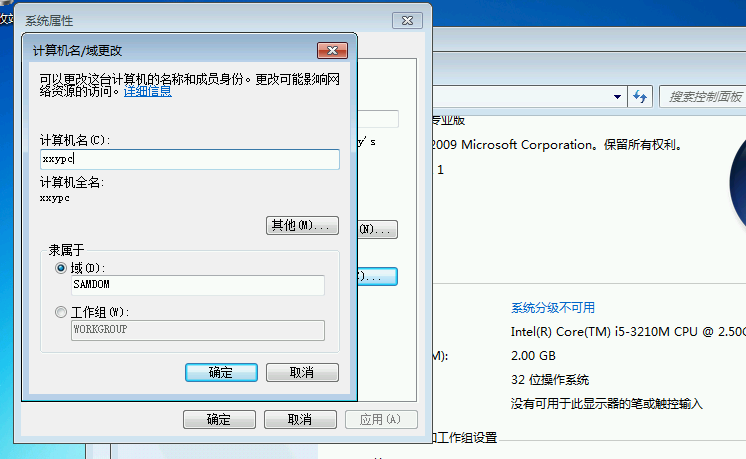
在电脑属性中输入域名和机器名
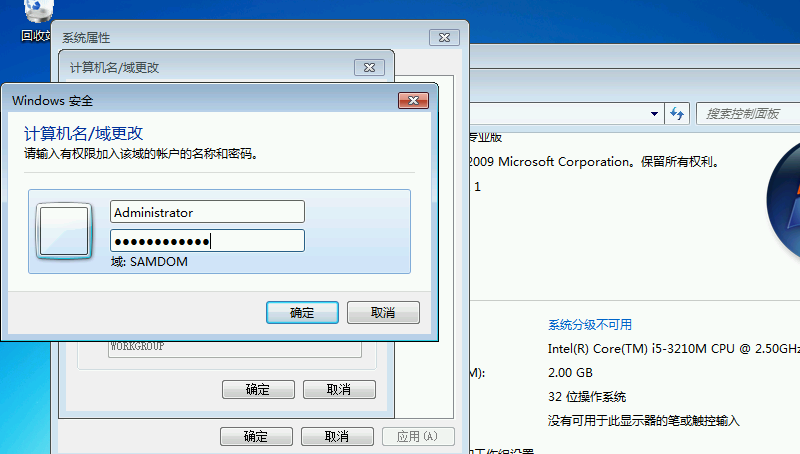
 输入域管理员的用户名和密码
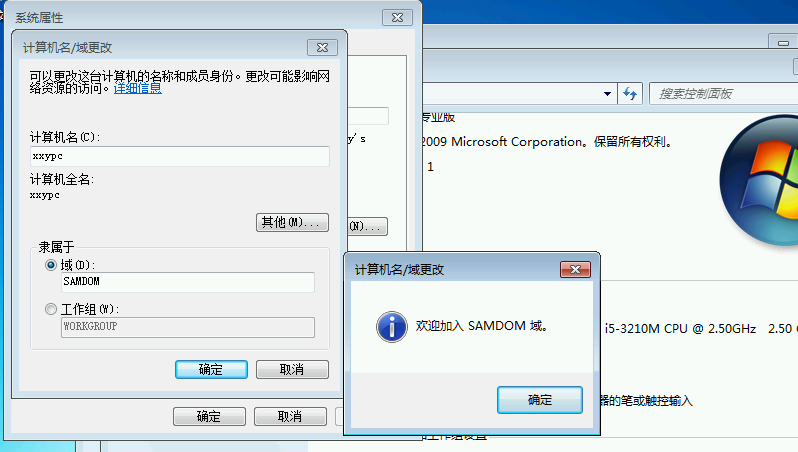
 点击“确认”加入
 用域用户登录,可以看到一个共享的Z盘
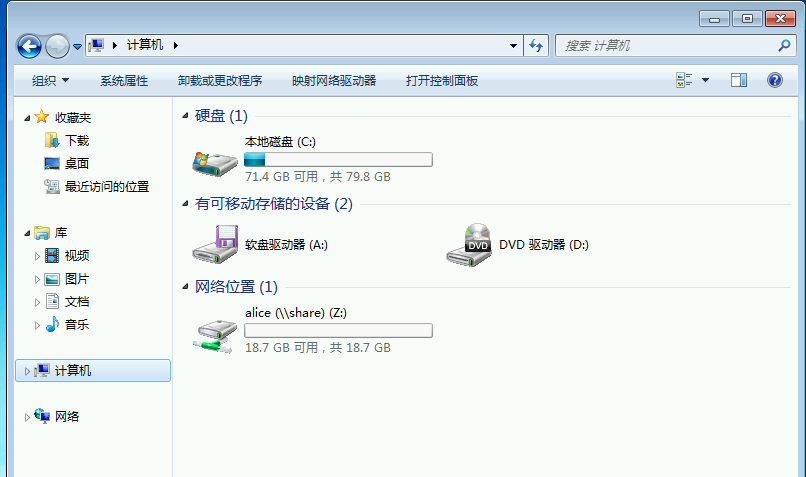 地址栏输入共享名\\share
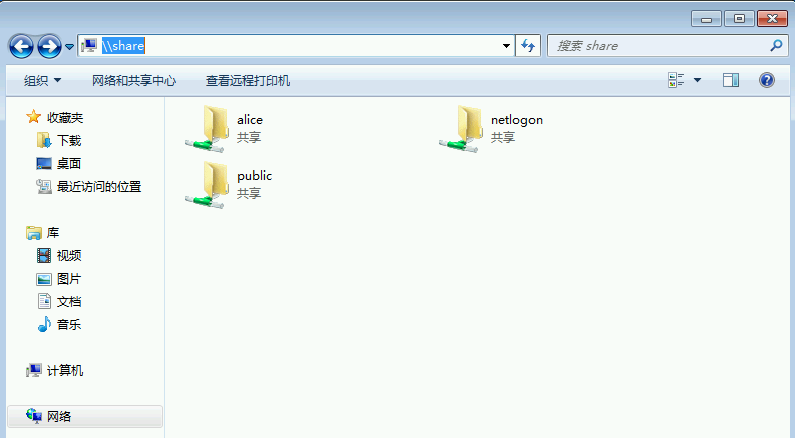 可以看到所有共享。
附:各个windows版本加入pdc是需要进行的设置。来自samba官方wiki
以win7和server 2008 r2为例,需要添加注册表条目:
Windows Registry Editor Version 5.00

[HKEY_LOCAL_MACHINE\System\CurrentControlSet\Services\LanManWorkstation\Parameters]

"DomainCompatibilityMode"=dword:00000001
"DNSNameResolutionRequired"=dword:00000000